
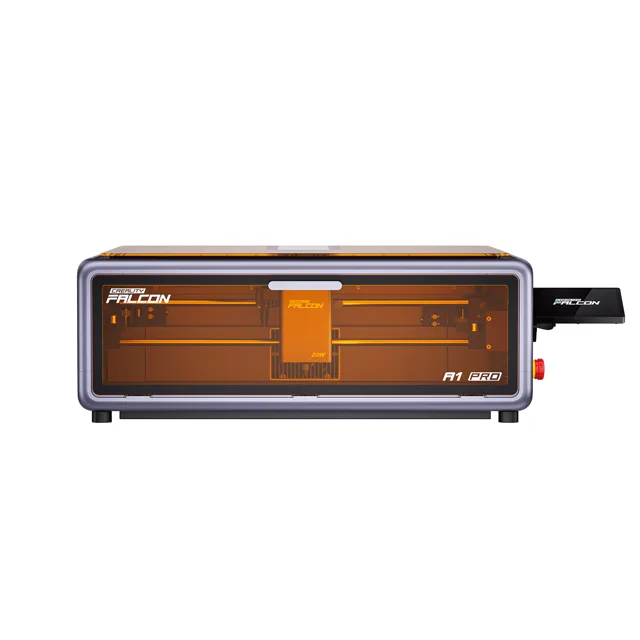
Creality Falcon A1 Pro 20W Laser Engraver Review
We may earn a commission from some links on this page.
The Creality Falcon A1 Pro 20W is a desktop laser that takes two light sources in one enclosed frame: a 20W diode module for cutting and deep engraving, and a 2W infrared module for fine marking on metal and small parts. Creality's listing notes that the modules are purchased separately, and surrounds the work area with a camera, a touchscreen and a set of safety shields. That combination is what separates it from a bare open-frame engraver. This review covers what each module is for, how the enclosure changes the way you work, and where the machine still asks something of its owner.
Key Takeaways
- A 20W diode module for cutting and engraving plus a 2W infrared module for fine metal marking; Creality lists the modules as purchased separately.
- Creality rates the machine for 350 or more materials.
- Fully enclosed, with Creality listing eight safety shields and an exhaust fan as part of the build.
- Camera-assisted placement and auto focus, quoted at 0.012 in precision.
- Touchscreen and app control, so a job can run without a computer tethered to the machine.
Two Laser Modules in One Machine
The 20W diode module is the working head for everyday material, and Creality rates the machine for 350 or more materials overall. The 2W module is a different tool wearing the same mount: an infrared source intended for marking metal and small parts rather than cutting wood, which is why Creality describes the machine as covering both cutting and fine marking. Creality's wiki documents changing the module, and the listing sells the two as separate purchases, so it is worth checking which module a given order includes. For anyone who wants both cutting and fine metal marking, that saves a second machine and the bench space it would take.
Enclosed Build and Safety
Everything happens inside a closed frame, and that changes both the safety story and the day-to-day routine. The cover is meant to keep the laser light inside while the job runs, and Creality lists eight safety shields around the machine. Airborne smoke is pulled through an exhaust fan, which matters more in a spare room than in a workshop with a door open. None of this makes the machine something to leave running unattended in a house, but an enclosure is a different proposition from an open frame that leaves the beam and the smoke in the room.
Detailed Features
The Creality Falcon A1 Pro 20W is built around the idea that the fiddly parts of laser work, focus and placement, should be handled by the machine. A camera looks down at the bed and shows the material in software, so a design can be dragged onto a scrap of wood or a row of blanks and seen where it will land. The same camera feeds the auto focus, which Creality quotes at 0.012 in precision. The touchscreen runs the job without a laptop, the app mirrors progress remotely, and Creality describes the build as a compact all-in-one modular design. Around all that sit the practical details: an enclosed work area, an extraction fan, and a modular build that lets the laser module be changed.
| Specification | What it means |
|---|---|
| Laser modules | 20W diode plus 2W infrared, sold separately |
| Materials | Rated for 350 or more |
| Focus | Camera auto focus, quoted at 0.012 in precision |
| Control | Touchscreen, app, computer over the usual software |
| Safety | Enclosure, eight safety shields |
| Extraction | Built-in exhaust fan |
Strengths and Weaknesses Overview
Two modules, an enclosure and a camera are a lot of machine in one box, and they shape who the Falcon A1 Pro suits. The strengths follow from that combination; the trade-offs follow from the same choices.
| What stands out | What to know |
|---|---|
| Cutting and fine metal marking from one frame | A fixed enclosure limits what you can feed in |
| Camera placement and auto focus shorten setup | Two modules means two sets of settings to learn |
| Interlocks and extraction make indoor use practical | Smoke still wants a window or a purifier nearby |
| Touchscreen and app mean no tethered computer | Batch work rewards a tidy, repeatable jig |
None of those trade-offs is unusual for an enclosed laser. They are simply the cost of the safety and convenience the enclosure brings.
Software and Workflow
Creality's own Falcon Design Space handles layout, camera capture and job settings, and the machine also works with the usual laser software over a computer connection. The workflow the hardware is designed around is short: place the material, let the camera show it, drag the design where it belongs, let auto focus set the height, then send. The screen keeps recent jobs one tap away, and the app shows progress from another room, which is useful for longer cuts. For repeated work, batch mode recognises several identical blanks and fills the same pattern on each, so a run of keyrings or coasters is one job rather than several. What it does not remove is the need to test settings on a new material before committing a good sheet to it.
Verdict
Judged as a whole, the Falcon A1 Pro is for the person who wants cutting and fine metal marking from one enclosed machine, and who would rather let the camera handle focus and placement than measure by hand. It is less suited to anyone who needs to work on long stock that will not pass through the enclosure, or who wants nothing beyond a bare laser and the lowest outlay. For a home workshop where the machine sits in a room that is used for other things, the enclosure does as much work as the two laser modules.
Frequently Asked Questions
What Materials Can It Cut and Engrave?
Creality quotes 350 or more materials across the two modules. The 20W diode does the cutting and engraving, while the 2W infrared module is meant for fine marking on metal and small parts.
Does It Need to Be Enclosed to Use?
It is enclosed as built. The cover is meant to keep the laser light inside during work and smoke is pulled through an exhaust fan. Creality lists eight safety shields around the machine.
How Does the Camera Help?
A camera looks down into the work area so you can place artwork on the material in software instead of measuring. Creality also uses it for auto focus, quoting 0.012 in precision.
Can It Run Without a Computer?
Yes. The machine has a touchscreen and app control, so a job can be sent from a phone or started from the screen, and progress can be watched remotely.
What Should I Budget for Beyond the Machine?
Creality sells a rotary roller that lets the machine work on cups, tumblers and other round objects. The 2W infrared module is a separate purchase as well, so check what a given order includes before you buy.