

Quick Answer: Comparing Cricut and Silhouette Cameo PRO highlights two cutting machine styles built for different workflows. Cricut focuses on guided software and everyday home crafts, while Silhouette Cameo PRO is oriented toward wider cutting areas and specialty tools. Choosing between them comes down to whether you prioritize a beginner-friendly setup for standard craft projects or wide-format capacity and deeper manual control.
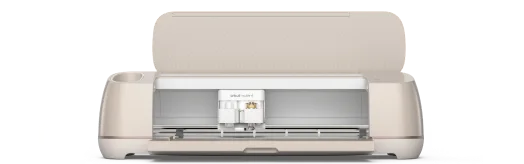 Cricut Maker 4
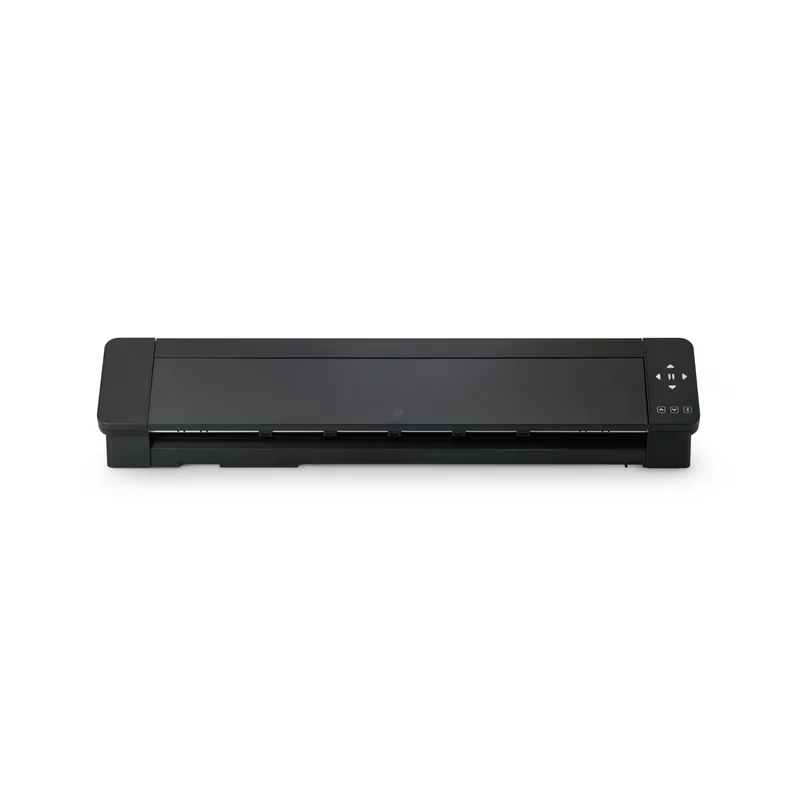 Silhouette Cameo PRO MK-II
Cricut Maker 4 vs Silhouette Cameo PRO at a Glance
| Feature | Cricut Maker 4 | Silhouette Cameo PRO MK-II |
|---|---|---|
| Device Style | Desktop smart cutting machine | Wide-format craft and vinyl cutter |
| Typical Project Scale | Small to medium everyday crafts | Large decals, banners, and wide-format projects |
| Specialty Tools | General craft blades and tools | Specialty options such as foil stamping and embossing |
Cricut Maker 4 Overview
The Cricut Maker 4 is a smart cutting machine aimed at beginners and casual crafters who want a guided workflow. It offers an approachable setup for starting everyday projects.
It supports a range of craft materials for small to medium projects. A similar current-generation Cricut machine is the Cricut Explore 5 Smart Cutting Machine Bundle, which also focuses on guided home crafting.
Silhouette Cameo PRO MK-II Overview
The Silhouette Cameo PRO MK-II is geared toward experienced crafters who need a wider cutting area. It is built for larger decals, signage, and multi-step projects.
In addition to standard vinyl and paper cuts, it supports specialty craft techniques such as foil stamping and embossing. Crafters looking at wide-format vinyl plotters in a similar large-scale category can also look at the VEVOR 28-Inch Dual-Blade Vinyl Cutter Machine, which offers a 28-inch max feed width and dual blades for signs and banners.
Cutting Capacity
The main difference between these two machines is working width. The Silhouette Cameo PRO MK-II is built for wide-format sheets and rolls, making it well suited to oversized wall graphics, large signs, and multi-item batches. The Cricut Maker 4 uses a standard desktop cutting width that suits cards, labels, apparel graphics, and everyday home crafts.
Ease of Use
Cricut machines emphasize a guided workflow that helps first-time users get started quickly. Wide-format cutters generally lean toward deeper manual layout control, which can take longer to learn but appeals to experienced crafters who prefer custom setups.
Material Compatibility
The Cricut Maker 4 works with a broad mix of craft materials including vinyl, cardstock, fabric, and leather for general crafting. The Silhouette Cameo PRO MK-II also handles a wide variety of materials and adds support for specialty techniques like foil work and embossing.
Key Differences
- The Silhouette Cameo PRO MK-II offers a wider cutting area for large-format projects.
- The Cricut Maker 4 emphasizes guided operation and quick setup for beginners.
- Silhouette supports specialty tools such as foil stamping and embossing.
- Cricut includes ready-to-use digital content for fast project starts.
Who Should Pick Each
Consider the Cricut Maker 4 if you want an approachable software workflow and versatile desktop cutting for small to medium projects. For crafters focused mainly on compact stickers, cards, and labels, a smaller Cricut option like the Cricut Joy Xtra fits a similar everyday workflow.
Consider the Silhouette Cameo PRO MK-II if you need a wider cutting area, manual design control, and specialty tooling for larger projects. Makers who prioritize a 28-inch feed width on a floor stand for high-volume decals and signs can also compare a wide plotter such as the VEVOR 28-Inch Vinyl Cutter Plotter with 20 Blades.
Frequently Asked Questions
Which machine is better for beginners?
The Cricut Maker 4 is generally more approachable for beginners who want a guided workflow for everyday craft projects.
Can the Silhouette cut thicker materials?
Yes, the Silhouette Cameo PRO MK-II is designed to handle larger and heavier craft materials alongside standard vinyl and cardstock.
Does the Cricut come with software?
Both brands provide companion design software for laying out and cutting projects; check each manufacturer's current listing for supported devices and operating systems.
Which machine supports more specialized tools?
The Silhouette Cameo PRO MK-II supports specialty options such as foil stamping and embossing for detailed craft work.
Choosing Between Cricut and Silhouette
Both platforms serve distinct types of crafters. The Cricut Maker 4 suits makers who want guided software and compact desktop versatility for everyday projects, while the Silhouette Cameo PRO MK-II suits users who need wide-format cutting capacity and specialty tools. Your choice depends on typical project size, preferred software style, and the materials you plan to cut most often.